Learn about Snowplow's S3 buckets
Last updated: October 9, 2026
This article describes a feature available to Snowplow CDI customers on Private Managed Cloud (PMC).
The Snowplow pipeline uses several S3 buckets as temporary storage locations during processing, and also to store events using different formats or levels of enrichment.
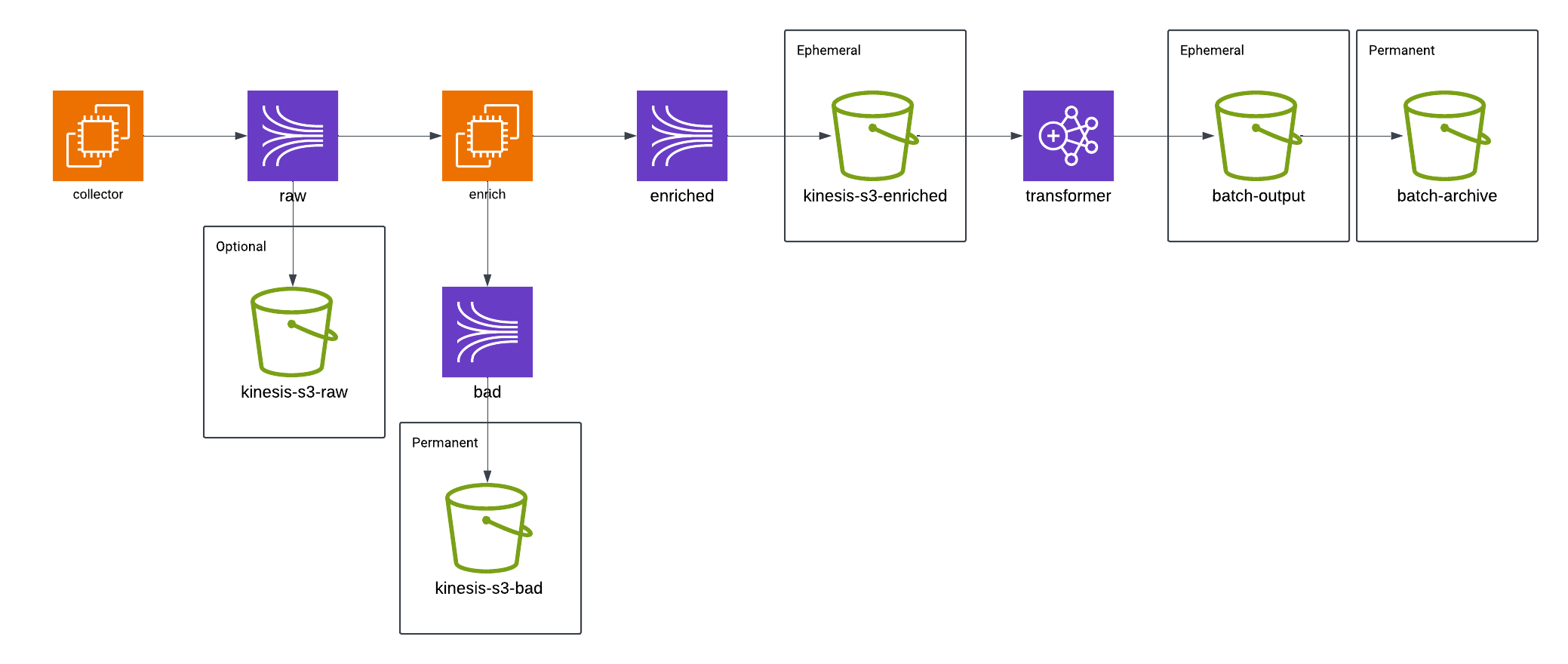
Depending on your specific pipeline configuration, you may be able to reduce reliance on S3 storage. As shown above for users of RDB Loader, some buckets are optional, and more buckets become optional for customers using a Streaming Loader.
Note
All Snowplow S3 buckets are prefixed with com-acme-111111111111-0-prod1- where com-acme is your customer tag and 111111111111 is your AWS ID.
S3 buckets
This section provides an overview of each S3 bucket maintained by Snowplow.
kinesis-hocons
contains real-time pipeline related configurations
recommended lifecycle rule: none
kinesis-s3-bad
bad data archive
a lifecycle rule can be set, but keep data long enough to be able to recover it if needed
helps to keep an eye on incoming bad data to spot any that need to be reprocessed
the recovery process could take a few weeks, and bad data is sometimes noticed late
recommended lifecycle rule: 90-day retention
if you use RDB Loader, keep this retention at least as long as the retention on the
/enrichedfolder of thebatch-archivebucket
kinesis-s3-enriched
(usually) a temp location for enriched data produced by the real-time pipeline
the files in it are regularly moved to a different bucket for processing by the batch job (
batch-archivebucket, see below)recommended lifecycle rule: none
<bucket>/prod1/2022-10-31-160401-*.gz
kinesis-s3-raw
no longer used, see https://support.snowplow.io/articles/3151716849-[AWS]-Sunsetting-the-S3-“raw”-bucket
can be safely deleted
batch-archive
all historical data divided into
/enrichedfolder/shreddedfolder (this may be named after your destination)
source:
com-acme-...-kinesis-s3-enrichedbucketinitially, the data is moved to this bucket into
/<env1>/enrichedfolder with the aim to beprocessed by batch transformer
consumed by tools like Athena or custom consumers
there is a dedicated folder for each batch/run which makes querying/consumption much easier than having to work with a huge folder as would be the case with
kinesis-s3-enrichedbucket (see above)once processed by batch transformer, the transformed data is loaded into
<env1>/shreddedfolderthis is typically the largest Snowplow bucket, so it has the biggest impact on S3 costs
recommended lifecycle rules:
/shredded(or your destination-named folder): 30-day expiration, as this data has already been loaded into your warehouse/enriched: 90-day expiration, or transition to a cheaper storage class (for example Glacier or Intelligent-Tiering) after 30 days if you need longer history for reprocessing, backfills or downstream consumers such as Athena
.../enriched/good/run=2022-10-31-16-01-31/2022-10-31-160401-*.gzWarning
Notify Snowplow before applying lifecycle rules on the batch-archive bucket, as we must align the transformer's processing window with your retention period. Otherwise, there is a high risk that transforming and loading the data into the destination completely fails or has high latency. Before expiring data, also check that no other tools or teams in your organization read from this bucket.
batch-output
temp location for currently processed data
the files in it are regularly moved to a different bucket for processing by the batch job
recommended lifecycle rule: none
batch-processing
currently used for logs only
recommended lifecycle rule: 30 to 90-day retention
hosted-assets
we use snowplow-hosted-assets-us-east-1 instead (if any)
recommended lifecycle rule: none
iglu-jsonpaths
created as part of the new pipeline for the storage of JSON Paths if automigration is not activated
the bucket from the old pipeline is being used in actuality, which is
snowplow-com-acme-igl-jsonpathsrecommended lifecycle rule: none
iglu-schemas
used alongside your Iglu servers
recommended lifecycle rule: none
FAQ
Please see below FAQs about Snowplow's S3 buckets.
Can I set up lifecycle policies for my buckets?
Yes, we don't take responsibility for managing lifecycle rules for S3 buckets, so you are fully empowered to configure lifecycle policies for your buckets. We have made what we believe to be best-practice recommendations for each bucket in the above section.
For more details and step-by-step instructions on setting up lifecycle policies, please refer to the AWS documentation.
Why is the batch-archive bucket my largest bucket?
The batch-archive bucket keeps every batch of enriched data and its transformed output. Without a lifecycle rule, it grows indefinitely and is usually the main driver of S3 costs. Applying the recommended rules above (after notifying Snowplow) is the most effective way to reduce these costs.
Do you support intelligent tiering?
Yes, we support Amazon S3 Intelligent-Tiering. For more details, see Learn about S3 Intelligent-Tiering, or contact our support team.
I've found buckets prefixed with sp-.
In case you find buckets starting with an sp- prefix, these are pre-terraform buckets created by our old deployment tool. If you're no longer using these sp- buckets, they can be safely deleted or archived.